$69.68
$121.94
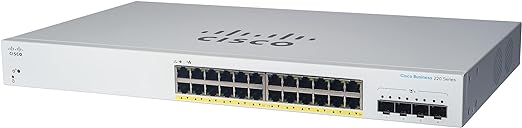
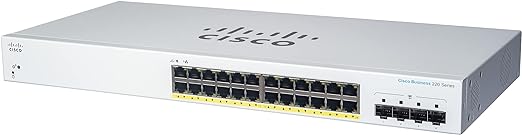
Cisco Business 220 Series Smart Switches The Cisco Business 220 Series are affordable smart switches with ease of use, security, and reliability for business-class networks. With intuitive dashboard, Power over Ethernet (PoE) options, and customizable features, these switches deliver a solid business network within your budget parameters. When you need a business-class network and cost is top priority, Cisco Business 220 Series provides an excellent solution. Prominent feature Business Applications With Cisco Business 220 Series switches, you can not only build an efficient and reliable network to connect the workforce, you can also create advanced solutions to deliver data, voice, and video services on a converged infrastructure. Get the best value for your money by improving the productivity of employees. Possible deployment scenarios include: Small office networking: The versatility and affordability of the Cisco Business 220 Series family of switches provide an ideal business-class networking foundation for small businesses with limited IT support and budget. Wireless connectivity: With PoE support, and comprehensive security and Quality of Service (QoS)capabilities, Cisco Business 220 Series switches provide a solid foundation to add business-grade wireless to the network. You can easily deploy Cisco Business wireless access points to increase workforce productivity without worrying about power and throughput. Unified communications: The Cisco Business 220 Series switches provide QoS features to automatically prioritize delay-sensitive traffic to help you easily deploy an IP-based communication solution on a converged network. PoE support can enable IP cameras and videophones to be easily added to your current network. Cisco offers a complete portfolio of IP telephony and other unified communications products designed for small businesses. Cisco Business 220 Series switches have been rigorously tested to help ensure easy integration and full compatibility with these and other vendor products. Features and benefits Cisco Business 220 Series provides capabilities that help you create business-class networks. These features deliver a solution to simplify the operation, increase uptime, and get your business better connected to employees, customers, and suppliers. Some primary features include: Easy configuration and deployment: Cisco Business 220 Series switches are designed to be easy to deploy and use by small businesses and the partners that manage them. Other ease-of-use features include the following: Cisco Business Dashboard is designed to manage Cisco Business switches, routers, and wireless access points. Using the Dashboard, you easily customize the interface and widgets to proactively manage your network. Cisco Business 220 Series switches connect directly to Cisco Business Dashboard, eliminating the need to set up separate hardware or a virtual machine on site. For more information, visit https://www.cisco.com/go/cbd. The Cisco Network Plug and Play solution provides a simple, secure, unified, and integrated offering to ease new device rollouts, as well as provisioning updates to an existing network. The solution provides a unified approach to provision Cisco routers, switches, and wireless devices with a zero touch deployment experience. The simple and intuitive web-based interfaces enable users without extensive IT expertise to configure, manage, and troubleshoot the switch in minutes. Configuration wizards simplify the most common configuration tasks and provide the tool for anyone to set up and manage the network. Reliability and performance. Cisco Business 220 Series switches have been tested to deliver the high availability and performance that users have come to expect from Cisco switches. The switches speed up file transfer times, keep vital business applications available, and help your employees respond more quickly to customers and each other. With enhanced QoS capabilities, the Cisco Business 220 Series also gives you the flexibility to manage and prioritize high-bandwidth traffic so you can easily integrate all the business communications and connectivity needs on a single converged infrastructure. Power over Ethernet (PoE). PoE streamlines the deployment for wireless access points, IP telephony,and video surveillance by allowing power and data to run over a single network cable. Cisco Business 220 Series switches support PoE , which provides up to 30 watts of power per port. PoE can enable deployments for 802.11ac wireless access points, Pan Tilt Zoom (PTZ) IP cameras, and videophones, delivering more flexibility and investment protection. Network security. The Cisco Business 220 Series switches provide new levels of security for smart switches and deliver more ways to safeguard your network. Support for network security applications such as the Institute for Electrical and Electronic Engineers (IEEE) 802.1X and port security can tightly limit access to specific segments of your network. Extensive Access Control Lists (ACLs) can restrict sensitive portions of the network from unauthorized users and guard against network attacks. Security mechanisms such as broadcast/multicast/unknown unicast storm control and Bridge Protocol Data Unit (BPDU) guard can protect the network from invalid configurations or malicious intent. Denial-of-Service (DOS) attack prevention helps to increase uptime in the event of a network attack. Optimal energy efficiency. Cisco Business 220 Series switches are designed with Energy Efficient Ethernet (IEEE 802.3az) and Energy Detect support on all models, as well as fanless designs on selected models. These designs help you save operational expenses and reduce your environmental footprint. Peace of mind and investment protection. Cisco Business 220 Series switches offer the reliable performance, investment protection, and peace of mind you expect from a Cisco switch. Complementary one-year access to our Small Business Support Center provides ongoing support. The 3-year limited hardware warranty with return to factory replacement keeps your business running smoothly Product specifications Performance Switching capacity Forwarding rate in millions of packets per second (mpps; 64-byte packets) 41.66 Switching capacity in Gigabits per second (Gbps) 56 Layer 2 switching MAC table Up to 8,192 Media Access Control (MAC) addresses Spanning Tree Protocol (STP) Standard 802.1d Spanning Tree support, enabled by default Fast convergence using 802.1w (Rapid Spanning Tree [RSTP]) Multiple Spanning Tree instances using 802.1s (MSTP) 16 instances are supported Feature Port grouping Support for IEEE 802.3ad Link Aggregation Control Protocol (LACP) Up to 8 groups Up to 8 ports per group with 16 candidate ports for each (dynamic) 802.3ad link aggregation Load balance based on source and destination MAC address, or source and destination MAC/IP VLAN Support for up to 256 Virtual Local Area Networks (VLANs) simultaneously Port-based and 802.1Q tag-based VLANs Management VLAN Guest VLAN Auto voice VLAN Voice traffic is automatically assigned to a voice-specific VLAN and treated with appropriate levels of QoS QinQ VLAN VLANs transparently cross a service provider network while isolating traffic among customers Generic VLANRegistration Protocol (GVRP) and Generic Attribute Registration Protocol (GARP) Protocols for automatically propagating and configuring VLANs in a bridged domain Head-of-Line (HOL)blocking HOL blocking prevention Jumbo frame Frame sizes up to 9,216 supported Loopback detection Loopback detection provides protection against loops by transmitting loop protocol packets out of ports on which loop protection has been enabled. It operates independently of STP. Automatic MediaDependent Interface Crossover (MDIX) Automatically adjusts transmit and receive pairs if an incorrect cable type (crossover or straightthrough) is installed. Security ACLs Drop or rate limit based on source and destination MAC, VLAN ID or IP address, protocol, port, Differentiated Services Code Point (DSCP)/IP precedence, Transmission Control Protocol (TCP)/ User Datagram Protocol (UDP) source and destination ports, 802.1p priority, Ethernet type, Internet Control Message Protocol (ICMP) packets, Internet Group Management Protocol (IGMP)packets, TCP flag Support up to 512 rules Port security Creates the ability to lock source MAC addresses to ports; limits the number of learned MACaddresses IEEE 802.1X (authenticator role) 802.1X: Remote Authentication Dial-in User Service (RADIUS) authentication; guest VLAN;Single-host, multiple-host, and multisession mode RADIUS, TACACS Supports RADIUS and Terminal Access Controller Access Control System (TACACS) authentication; switch functions as a client MAC address filtering Supported Storm control Broadcast, multicast, and unknown unicast DoS protection DOS attack prevention STP Bridge Protocol Data Unit (BPDU) Guard This security mechanism protects the network from invalid configurations. A port enabled for BPDU Guard is shut down if a BPDU message is received on that port. Spanning Tree Loop Guard This feature provides additional protection against Layer 2 forwarding loops (STP loops). Secure Shell (SSH) Protocol SSH is a secure replacement for Telnet traffic. SCP also uses SSH. SSH v1 and v2 are supported. Secure Sockets Layer (SSL) SSL support: Encrypts all HTTPS traffic, allowing highly secure access to the browser-based management GUI in the switch QoS Priority levels 8 hardware queues per port Scheduling Strict priority and Weighted Round-Robin (WRR) queue assignment based on DSCP and class of service (802.1p/CoS) Class of service Port-based; 802.1p VLAN priority-based; IPv4/v6 IP precedence, Type of Service (ToS), and DSCP-based; Differentiated Services (DiffServ); classification and re-marking ACLs, trusted QoS Rate limiting Ingress policer; egress shaping and rate control; per VLAN, per port, and flow based Congestion avoidance A TCP congestion avoidance algorithm is required to reduce and prevent global TCP loss synchronization. Multicast Internet Group Management Protocol (IGMP) Versions 1, 2, and 3 Snooping IGMP limits bandwidth-intensive multicast traffic to only the requesters; supports 256 multicast groups IGMP querier IGMP querier is used to support a Layer 2 multicast domain of snooping switches in the absence of a multicast router Standards IEEE 802.3 10BASE-T Ethernet, IEEE 802.3u 100BASE-TX Fast Ethernet, IEEE 802.3ab 1000BASE-T Gigabit Ethernet, IEEE 802.3ad LACP, IEEE 802.3z Gigabit Ethernet, IEEE 802.3x Flow Control, IEEE 802.1D (STP, GARP, and GVRP), IEEE 802.1Q/p VLAN, IEEE 802.1w RSTP, IEEE 802.1s Multiple STP, IEEE 802.1X Port Access Authentication, IEEE 802.3af, IEEE 802.3at, RFC 768, Request for Comments (RFC) 783, RFC 791, RFC 792, RFC 793, RFC 813, RFC 879, RFC 896, RFC 826, RFC 854, RFC 855, RFC 856, RFC 858, RFC 894, RFC 919, RFC 922, RFC 920, RFC 950, RFC 1042, RFC 1071, RFC 1123, RFC 1141, RFC 1155, RFC 1157, RFC 1350, RFC 1533, RFC 1541, RFC 1624, RFC 1700, RFC 1867, RFC 2030, RFC 2616, RFC 2131, RFC 2132, RFC 3164, RFC 3411, RFC 3412, RFC 3413, RFC 3414, RFC 3415, RFC 2576, RFC 4330, RFC 1213, RFC 1215, RFC 1286, RFC 1442, RFC 1451, RFC 1493, RFC1573, RFC 1643, RFC 1757, RFC 1907, RFC 2011, RFC 2012, RFC 2013, RFC 2233, RFC 2618, RFC 2665, RFC 2666, RFC 2674, RFC 2737, RFC 2819, RFC 2863, RFC 1157, RFC 1493, RFC 1215, RFC 3416 IPv6 IPv6 IPv6 host mode IPv6 over Ethernet IPv6/IPv4 Dual Stack IPv6 neighbor and router discovery (ND) IPv6 stateless address auto-configuration Path Maximum Transmission Unit (MTU) discovery Duplicate Address Detection (DAD) ICMP version 6 IPv6 ACL Drop or rate limit IPv6 packets in hardware IPv6 QoS Prioritize IPv6 packets in hardware Multicast Listener Discovery (MLD v1/2) Snooping Deliver IPv6 multicast packets only to the required receivers IPv6 applications Web/SSL, Telnet server/SSH, DHCP Client, DHCP Autoconfig, Cisco Discovery Protocol (CDP),Link Layer Discovery Protocol (LLDP) IPv6 Requests for Comments (RFCs) supported RFC 4443 (which obsoletes RFC2463) – ICMP version 6 RFC 4291 (which obsoletes RFC 3513) – IPv6 address architecture RFC 4291 – IPv6 addressing architecture RFC 2460 – IPv6 specification RFC 4861 (which obsoletes RFC 2461) – Neighbor discovery for IPv6 RFC 4862 (which obsoletes RFC 2462) – IPv6 stateless address auto configuration RFC 1981 – Path MTU discovery RFC 4007 – IPv6 scoped address architecture RFC 3484 – Default address selection mechanism Management Cisco Business Dashboard Support direct management with Cisco Business Dashboard and mobile app. Eliminates the need to set up a separate hardware or virtual machine for the Cisco Business Dashboard Probe on site. Cisco Business mobile app Mobile app for Cisco Business Switch and Wireless products. Helps to set up a local network inminutes and provide easy management at your fingertips. Cisco Network Plug and Play (PnP) agent The Cisco Network Plug and Play solution provides a simple, secure, unified, and integrated offering to ease new branch or campus device rollouts or for provisioning updates to an existing network. The solution provides a unified approach to provision Cisco routers, switches, and wireless devices with a zero touch deployment experience. Supports Cisco PnP Connect Web user interface Built-in switch configuration utility for easy browser-based device configuration (HTTP/HTTPS).Supports configuration, system dashboard, system maintenance, and monitoring Text-editable config files Config files can be edited with a text editor and downloaded to another switch, facilitating easier mass deployment Command-lineinterface Scriptable CLI; a full CLI is supported. User privilege levels 1 and 15 are supported for the CLI SNMP Simple Management Network Protocol (SNMP) versions 1, 2c, and 3 with support for traps, and SNMP version 3 User-based Security Model (USM) Standard Management Information Bases (MIBs) MIB-II (RFC1213) IF-MIB (RFC2863) Bridge-MIB (RFC4188) Bridge-MIB-Extension (RFC2674) RMON (RFC2819) Etherlike MIB (RFC3635) Radius Client MIB (RFC2618) Entity MIB (RFC2737) POWER-ETHERNET-MIB (RFC3621) Syslog MIB (RFC3164) Generic Traps MIB (RFC1215) SNMP-COMMUNITY-MIB SNMP-MIB LLDP-MIB LLDP-EXT-MED-MIB IEEE8023-LAG-MIB CISCO-PORT-SECURITY-MIB CISCO-ENVMON-MIB CISCO-CDP-MIB CISCO-CONFIG-COPY-MIB Remote Monitoring (RMON) Embedded RMON software agent supports 4 RMON groups (history, statistics, alarms, and events) for enhanced traffic management, monitoring, and analysis IPv4 and IPv6 dual stack Coexistence of both protocol stacks to ease migration Port mirroring Traffic on a port or VLAN can be mirrored to another port for analysis with a network analyzer or RMON probe. Up to 8 source ports can be mirrored to one destination port. Four sessions are supported. Firmware upgrade Web browser upgrade (HTTP/HTTPS) and Trivial File Transfer Protocol (TFTP) Dual images for resilient firmware upgrades DHCP (Option 12, 66, 67, 82, 129, and 150) DHCP options facilitate tighter control from a central point (DHCP server) to obtain IP address,auto-configuration (with configuration file download), DHCP relay, and hostname Time synchronization Simple Network Time Protocol (SNTP) Login banner Configurable multiple banners for web as well as CLI Other management HTTP/HTTPS; TFTP upgrade; DHCP client; Bootstrap Protocol (BOOTP); cable diagnostics; ping; traceroute; syslog Discovery Bonjour The switch advertises itself using the Bonjour protocol Link Layer Discovery Protocol (LLDP) (802.1ab) with LLDPMED Extensions LLDP allows the switch to advertise its identification, configuration, and capabilities to neighboring devices that store the data in a MIB. LLDP-MED is an enhancement to LLDP that adds the extensions needed for IP phones. Cisco Discovery Protocol The switch advertises itself using the Cisco Discovery Protocol. Displays brief information for connected Cisco network devices, IP phones, and wireless access points Power efficiency EEE compliance(802.3az) Support 802.3az Energy Efficient Ethernet on all ports; substantially reduce the power consumption when link bandwidth is not at full utilization Energy Detect Automatically turns power off on Gigabit Ethernet and 10/100 RJ-45 ports when detecting a link down Active mode is resumed without loss of any packets when the switch detects the link up Disable port LEDs LEDs can be manually turned off to save on energy. Time-based port operation Link up or down based on user-defined schedule (when the port is administratively up). Power over Ethernet 802.3af PoE or 802.3at PoE delivered over any of the RJ-45 network ports within the listed power budgets Switches support 802.3af, 802.3at, and Cisco pre-standard (legacy) PoE with maximum powerof 30 W per port. This applies to the following PoE-enabled models; the maximum number of ports providing PoE power simultaneously is determined by the total PoE budget for the switch listed as below: PoE Power Budget 195 W Number of Ports That Support PoE 24 Pre-standard PoE Support Cisco Pre-Standard PoE Intelligent PoE power management Support the granular power negotiation with CDP/LLDP communication with PD devices after IEEE classification Hardware Buttons Reset button Cabling type Unshielded Twisted Pair (UTP) Category 5 or better for 10BASE-T/100BASE-TX; UTP Category 5 Ethernet or better for 1000BASE-T LEDs System, Link/Act, Speed Flash 64 MB CPU memory 256 MB Ports Total system ports 28 Gigabit Ethernet RJ-45 ports 24 Gigabit Ethernet Uplink ports 4 Gigabit Ethernet SFP Packet buffer 4.1 Mb Environmental Unit dimensions (W x D x H) 440 x 257 x 44 mm (17.3 x 10.1 x 1.7 in) Unit weight 4.07 kg (8.97 lb) Certifications UL (UL 60950), CSA (CSA 22.2), CE mark, FCC Part 15 (CFR 47) Class A, C-tick Operating temperature 0-50° C Storage temperature –20° C to 70° C Operating humidity 10% to 90%, relative, noncondensing Storage humidity 10% to 90%, relative, noncondensing Power Consumption System power consumption 110V=30.2W 220V=30.4W Power consumption (with PoE) 110V=244.3W 220V=240.3W Heat dissipation (BTU/hr) 833.59 Acoustic Noise and Mean Time Between Failure (MTBF) Fan (number) 2 Acoustic noise 25°C: 42.7 dB MTBF @ 25°C (hours) 587,473 Package contents CBS220-24P-4G 24 10/100/1000 ports with 195W power budget 4 Gigabit SFP Cisco Business 220 Series Ethernet switch Power cord or adaptor Mounting kit Quick start guide
Switches